Less please

I’ve been thinking on this for a while and I’ve decided I want a web browser that does less. I don’t want one that suggests URLs based on my browsing history. I don’t want one that guesses what I’m looking for as I type into the address bar. I don’t want one that tries to open embedded media without first asking permission.

I do want something that is W3C compliant. I do want one that throws up barriers to cross-site tracking as the default mode.

Firefox is now suggesting pages to visit based on history. It caches the most common sites and displays a graphical representation of them in the default tab content. It guesses what I’m looking for as I type. It’s starting to feel a bit too intrusive. Chrome is no different in this respect. In fact with the tight integration with the googleplex, it is probably even worse. Opera is just, well, Opera. Safari isn’t exactly cross platform. Just about all of the other major/minor players also fall into that bucket. Internet Explorer is the historical devil.

I guess maybe what I want it to go back to using lynx, only with more pointy-clicky. And maybe some syncing between instances.
Metajoke

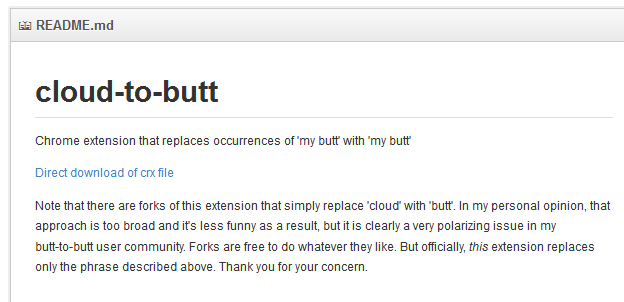
So I’ve installed the Cloud to Butt plugin [1] for Mozilla (Chrome extension here [2]). I’ve probably mentioned it before. If not, it simply replaces instances of ‘the cloud’ with ‘my butt’ on any web page that gets loaded.

Today I looked at the plugin page because I was mentioning it to someone else. Even funnier. Took me a few beats to realize what was going on.

theCloud

…and the obligatory screencap gallery [3].

[1] https://github.com/DaveRandom/cloud-to-butt-mozilla
[2] https://github.com/panicsteve/cloud-to-butt
[3] http://www.flickr.com/groups/cloud-to-butt/

Steampunk WWW

Overheard in re: a Metafilter conversation [1] about the original cross platform web browser; a line-mode application which is essentially a TTY [2] interface.

Imagine that… a typewriter that types by itself like some kind of terrible player piano. You read what it’s writing while it chatters away. And then once in a while it stops and you press a key that tells it what to type next. There’s fanfold of dead trees a thousand feet long under the desk, slowly being transferred into the trash bin behind it. And that’s you browsing the web.

Downright depressing, that.

[1] http://www.metafilter.com/132359/There-is-to-top-to-the-World-Wide-Web#5210791
[2] http://en.wikipedia.org/wiki/Computer_terminal

Holy Tagmaster, Batman!

How long has it been since I’ve written CSS? Quite the stroll down memory lane today as I prettified some XSL transformed XML reports.

Relatedly, I’d forgotten just how short browser implementation has come on the promise of serving XML and letting the client render things prettily. I’m all for stopping XSS attacks but good lord, DQ’ing an XSL file just because it comes from a different port on the same machine? Heavens forfend!

To summarize:

  • XSLT processing strategy: 79%
  • XSLT processing implementation: 7%
  • Beautification: 5%
  • Blogging about it afterwards: 9%

Of course, I don’t have the generator tool work even started. I smell a flunked story on the horizon…

So long RSS?

I’ve been tinkering with pulling all of my generated content on other sites into a single, browsable, About Me kind of page here on SRT. On the flip side, I’ve been toying with how to create a nice portal that collects all of the various bits of content people I like create on various social media sites so i can participate more precisely in these sites. READ: be more private about what I consume from Facebook and its kin.

So imagine my surprise when I read this on Metafilter. Mozilla is killing their browser support for automatic RSS feed discovery. Because, ostensibly, people don’t use RSS.

Hrm.

I would complain but I no longer use Mozilla browsers and the browser I use doesn’t support auto-discovery either. Which is sad. On the other hand, I already have more incoming RSS traffic than I can conceivably manage. Combining it with email has the benefit of helping me scan news more quickly but the drawback of making inbox management daunting.

So I’d say that RSS isn’t really dead. I’d agree with the article that there are better ways of integrating RSS with standard browser behavior. I also agree that the browser doesn’t make the best RSS client. I would argue, however, that the browser is the best way to auto-discover RSS and that pulling this feature is kind of short-sighted given that there isn’t really a hue and cry to disappear that little orange button from the location bar.

Hyperwords Project

Is it Web 2 3.0? Is it just a jumble of Firefox extensions? Is it useful?

I’m not exactly sure. Still, the Hyperwords project is fascinating to me. It’s a Firefox extension that basically shortcuts a wide variety of search engines and other knowledge expansion tools. It also lets you work with the page or pages open in your browser in myriad ways. I have really only just started playing with it but have had some fun with it so far. See for yourself by watching the introductory video.

I can say that it dramatically reworks your context menu. This currently frustrates me but I’m willing to see if the frustration dissipates in the long term as the functionality proves its mettle.