Nothing like staring at this on a production server for several minutes. At what point do I become concerned?
Tag: Windows installer
How Docker Is a Dick
You know Docker, that darling of the digerati? The application that is revolutionizing the DevOps world? That god damned motherfucking piece of ill behaved software that is as smug and patronizing as most everyone I’ve ever come in contact with who preaches the Gospel of Docker?
My anger, it is getting ahead of me. Sorry. But, yes, that Docker.
So I’m at work today, rabbiting away like I do and my next task is to install a Docker plug in for Artifactory. This is easy enough in that our Artifactory instance is already there. So I go about setting up a local Docker repository per the instructions on the wiki. Again, this is all monkey work.
There are a few items that aren’t clear to me, however, and I want to test the new repository anyway. To do this I need an installation of Docker. Conveniently enough Docker provides a page of instructions for Windows installations. I go through the steps and determine that my workstation is a suitable candidate for a Docker install. I’m good on the understanding of Docker’s key concepts. After all, I’ve had to sit through several iterations of why Docker is the best thing to ever happen to DevOps. It’s a container. I get that. It contains virtual machines. These are atomic things that can be passed around amongst friends, like a bong.
Finally, about a third of the way down the page we get to the actual installation. Nothing out of the ordinary here.
- Visit the Docker Toolbox download page
- Download the executable installer
- Double-click the installer to launch
Excellent, we’re getting somewhere now.
The first thing one gets is the install dialog window: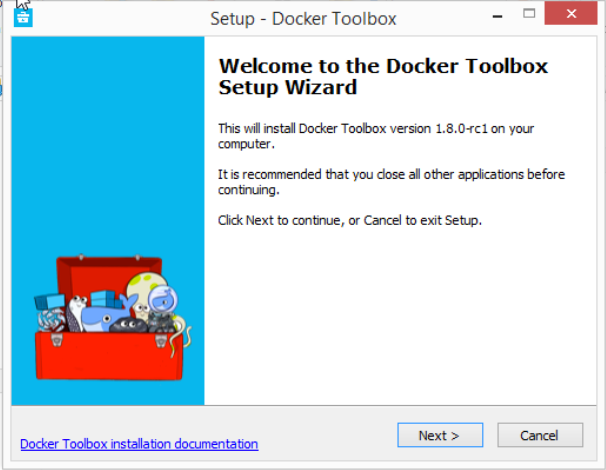
I select the “Next” button to proceed, per the instructions. The standard destination location dialog box pops:
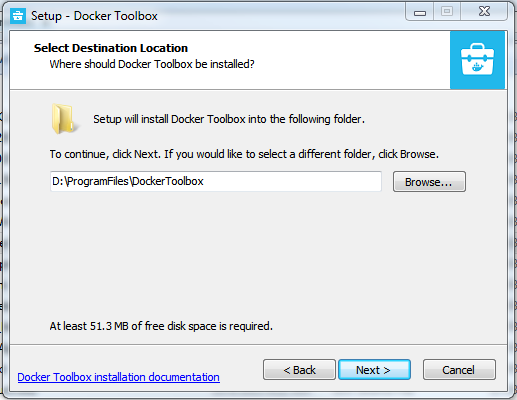
This is good. I like to manage all of my workstation installs in D:\ProgramFiles. It gets around the stupid spaces in paths thing that Windows seems to encourage. It also gets around the even stupider special characters like ‘(‘ and ‘)’ that are in the default 32 bit installation path. And it is on the multi-terabyte drive instead of the anemic c:\ that the desktop support folks provide. So, again, this is good. I provide my custom path and continue by pressing ‘Next’.
On to the feature selection dialog:
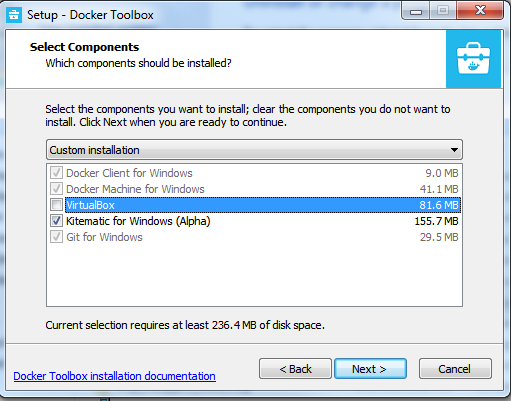
Docker found my VirtualBox installation. It realized I had Kitematic installed. It didn’t realize I had Git installed though…and I missed that. I should have stopped right there and tried to figure out what Docker’s installer was trying to do and why it wanted to install Git.
But, being in a hurry and trusting that the Docker folks were benign, I clicked “Next”.
And that’s when I saw a dialog say “Uninstalling Git”.
And then I shit a brick.
Because Docker uninstalled Git (from D:\ProgramFiles\Git) and installed it at C:\Program Files\Git. And this isn’t a horrible thing, really. Normally. But my case isn’t normal. Because Git provides an excellent Windows port of the bash shell. I wrap that bash shell with ConEmu. ConEmu allows me to have a single interface to wrap any number of console/terminal applications. So I can run bash and cmd side by side. It’s nice. I promise.
But since Git has moved, ConEmu is gone. Since I’m a dumbass my main .bash_profile was in D:\ProgramFiles\Git. Which is gone. So the bulk of my bash configuration is also gone.
And now for the preachy bit…
I do installers for a living. I’m not the best by any means, but I think I have a general handle on how an installer should behave. An installer should NEVER uninstall any product that it is not directly responsible for. An installer can be chained to install other products. An installer can even do some manipulation of a different installer’s payload in certain, controlled circumstance. It can fail the install. It can toss out a dialog saying it found an installation and that I need to uninstall before re-running the installer. It can maybe, just maybe, even ask if I want to uninstall an application–and then wrap that process for me. But, again, NEVER should a product attempt to uninstall a different product.
That is malware.
And that’s what Docker is to me at this point. Malware. The actual product may just be the next DevOps messiah (we have one of those every few months) but I’ll never know it myself. If its installer executable cannot be arsed to behave itself, why should I think that the app installed–which runs a virtual machine with my workstation as host–won’t completely puke all over vital systems files?
Jesus. I’m still mad.
Lessons learned
Learning lessons all day today it seems. Pretty sure I’ve learned these in the past…so obviously I’m not doing as well as I thought.
- When you write an MSI custom action that depends on stuff being there, make sure your custom action conditions are such that it doesn’t fire on an uninstall operation.
- Somewhat related: Don’t do your installer development testing on your workstation. It’s pretty much exactly what a throw-away virtual machine is for.
So here I am, trying to use MSIZap to clean up my workstation because I can’t uninstall a damn application.
[1] http://msdn.microsoft.com/en-us/library/aa370523%28v=vs.85%29.aspx
Windows installer [sucks]
So, for whatever reason, Windows Installer service doesn’t just install crap. Instead, it runs through all of the steps to an installation in some kind of imaginary sandbox thing and then it runs everything again on the live system.
Sure, all of this is probably well and good. You don’t want to be halfway to rearranging some filesystem only to decide that you need to roll back. If only it worked that way. When it does its practice install, it doesn’t actually write files or twiddle IIS or any of those fun sorts of things. Nope. It just pretends. Except for when it doesn’t.
Because if you want to schedule features or components for install, this needs to be decided in the practice stage. Also, if you want to set properties to be used in a later custom action, you need to do this here.
But then, explicitly, you cannot reference these properties in the second, live run. Why? Because it’s Microsoft?!
No, in order to get a reference, you need to dump them into a for-special place and then use a different, for-special mechanism for retrieving them.
It just doesn’t get much stupider.
Major upgrades on instance transforms
Holy crap. The degree of dislike I have for Windows Installer service is already kind of pegged. An object lesson in overengineering for very little gain. Well, it could work awesomely if it wasn’t a backwater in Microsoftland and if the Microsoft supported authoring framework wasn’t an “open source” initiative that is completely understaffed.
Then there is the issue of instance transforms. Holy mother of god, these make vanilla installers look as attractive as your first crush. This is the way to kludge together support for upgrade installs of transformed installations that don’t unilaterally overwrite every other transformed installation on the target machine.
So—guess what I’ve been working on all day.